Fetching Results
fetch-results writes the results of a Robot Framework run back into the
TestBench report the suites were generated from.
How it works
   ┌────────────────────────┐        ┌────────────────────────────┐
   │  TestBench JSON        │        │  Robot Framework           │
   │  report (in)           │   +    │  output.xml                │
   │  (directory or .zip)   │        │  (the executed results)    │
   └───────────┬────────────┘        └─────────────┬──────────────┘
               └────────────────┬──────────────────┘   ┌────────────────────────┐
                                │                      │  Configuration         │
                                ▼                      │  / TOML / CLI options  │
                     ┌─────────────────────┐           └─────────────┬──────────┘
                     │   fetch-results     │─────────────────────────┘
                     └──────────┬──────────┘
                                ▼
                ┌───────────────────────────────┐
                │  TestBench JSON report (out)  │
                │  with results:                │
                │    verdicts + execution       │
                │    comments, protocol.json,   │
                │    references, attachments    │
                └───────────────────────────────┘
- In: the original TestBench report (the same directory or ZIP file the suites
were generated from) and the Robot Framework
output.xmlof the run. - Out: an updated TestBench JSON report you can import back into TestBench.
With
-dit is written to a new location and the input report stays untouched; without-dthe input report is overwritten. All six input/output combinations are listed underoutput-directorywithfetch-results.
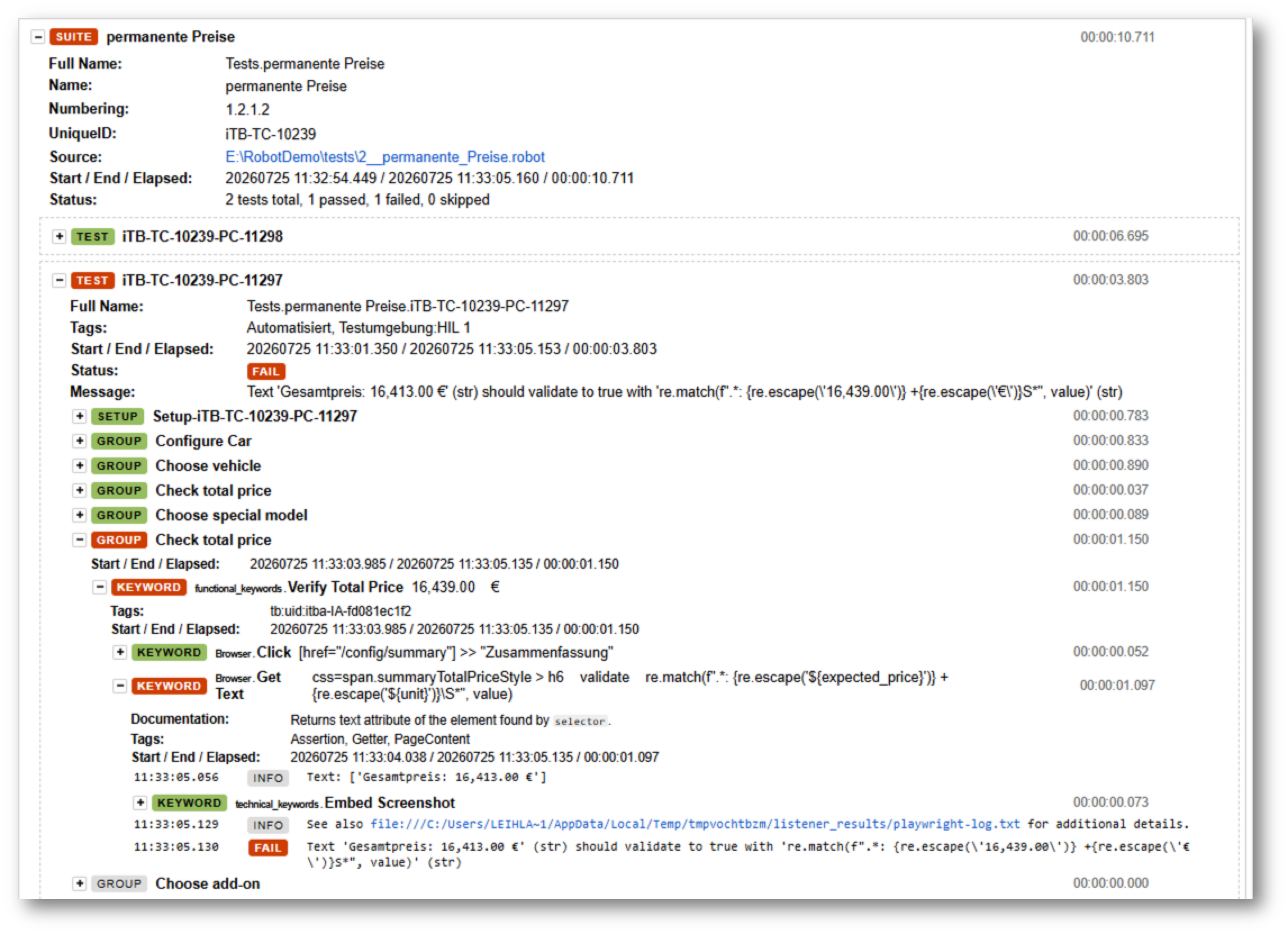
Img-1: Robot Framework log.html of a test run
This Robot Framework execution result is written back into the TestBench report and can be imported back into TestBench and viewed in details in the Web iTORX.
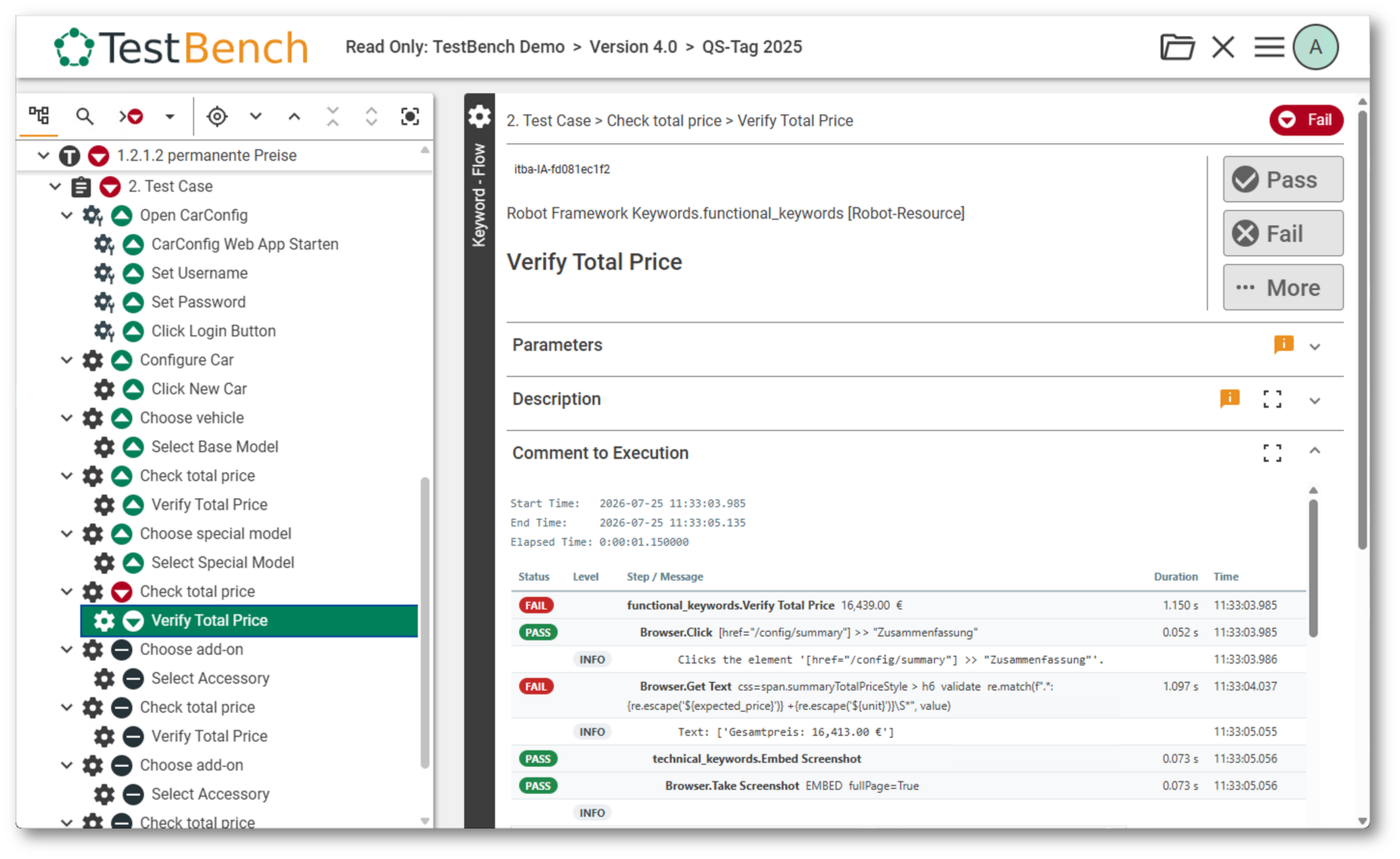
Img-2: Test Case Set Execution in iTORX
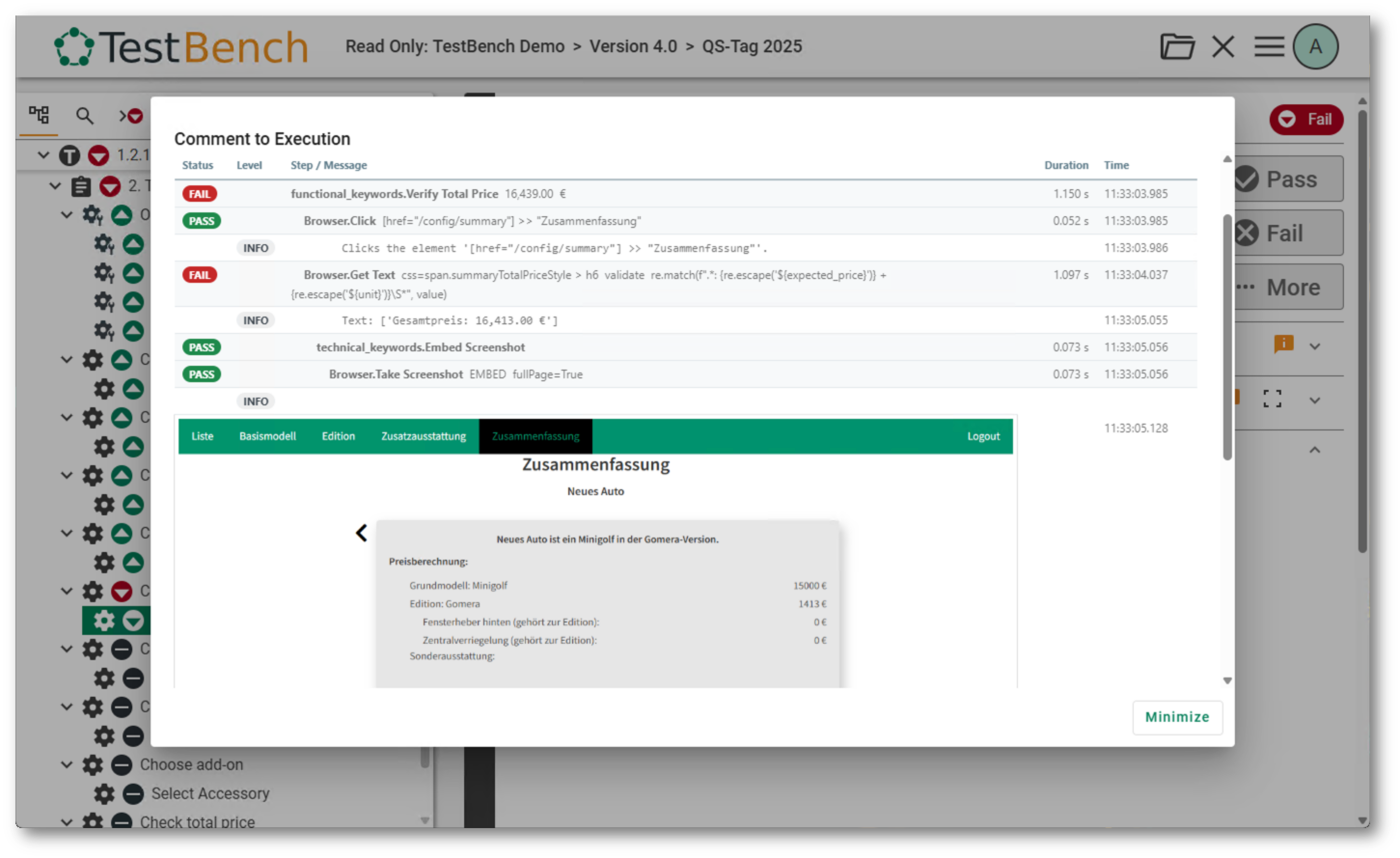
Img-3: Keyword Execution Log in iTORX (with failed keyword)
The level of detail in the execution comment is controlled by the keyword-comment-* options —
keyword-comment-style,
keyword-comment-max-depth,
keyword-comment-max-rows
and
keyword-comment-log-level.
If you do not need the whole technical details, you can reduce the depth and number of rows to keep the comment compact.
In TestBench, the execution is shown also on test case set level with execution time, error message and verdict.
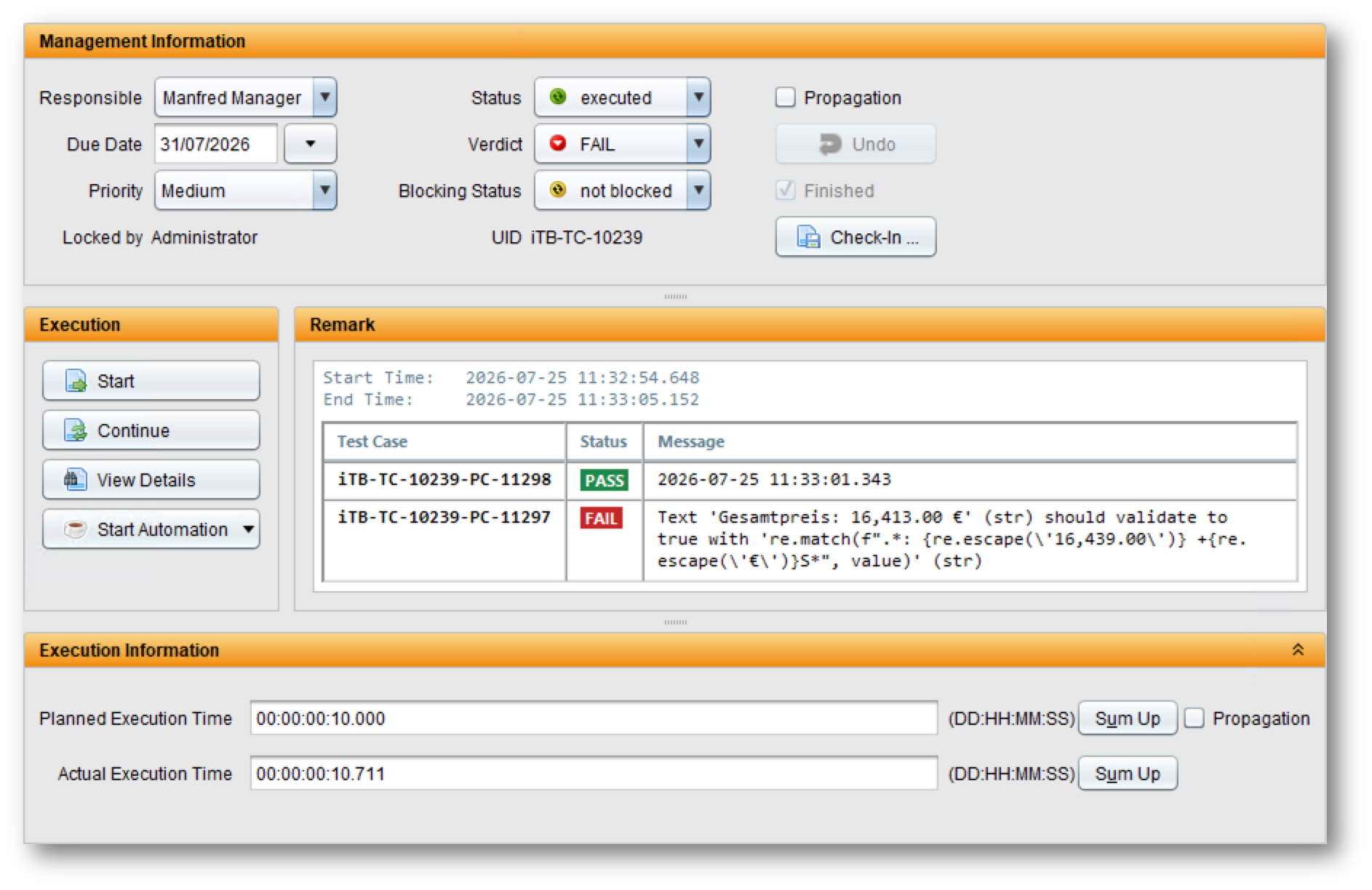
Img-4: Execution Comment in TestBench (with failed test case)
Robot suites and tests are matched to TestBench elements by the UniqueID
metadata that generate-tests wrote into every suite — so both files must come
from the same generation.
testbench2robotframework fetch-results -d ./updated_report.zip output.xml my_report.zip
How the command line is structured is explained in Command-Line Usage; every option and its values is described in the Configuration Reference.
What is written back
- The verdict and status of every keyword, test case and test case set, plus HTML execution comments.
- The verdicts in the test structure tree (
cycle_structure.json), aggregated upwards: test case → test case set → test theme, using the TestBench verdict priority (BlockedoutranksFail,FailoutranksUndefined, …). - The main protocol (
protocol.json) andreferences.json. - Attachments referenced from test messages.
Merging results into the protocol
By default the results are merged into the protocol.json already contained
in the report instead of overwriting it:
- Executions the Robot run covers are replaced by the new result.
- Executions the run does not cover are kept unchanged.
- The verdict of a test case set (and its parent themes) is recomputed over all
its test cases — the preserved ones and the newly executed ones. A set whose
preserved test case failed therefore stays
Fail, even when every test of the current run passed.
This lets you execute and report a cycle in several partial runs. Turn it off with
merge-protocol / --no-merge-protocol
to write only the current run's results.
Merging always starts from the protocol in the input report. Running
fetch-results twice with the same input report does not accumulate results — the
second run starts over. To combine several Robot runs, merge the output XMLs first
(rebot --merge output1.xml output2.xml) and call fetch-results once.
Tester
The results do not name a tester by default. With
set-tester-from-report-creator / --set-tester-from-report-creator
the user who created the TestBench report becomes the tester of every test case the
run executed with the verdict Pass or Fail.
Execution comments
The execution comment of a keyword shows the structure of the Robot Framework
user keyword behind it — its sub keywords, control structures and loop iterations,
each with its own log messages in the order Robot recorded them. A keyword not
executed because an earlier one failed shows as NOT RUN. Test case and test case
set comments lead with a status pill and a compact summary.
The comment is deliberately plain HTML (one flat table, no nested tables, no CSS classes) so it survives a PDF export, a paste into Word, and the WYSIWYG editor of the TestBench client.
How much of that structure is shown, and which log levels, is controlled by the
keyword-comment-* options —
keyword-comment-style,
keyword-comment-max-depth,
keyword-comment-max-rows
and
keyword-comment-log-level.
References and attachments
Files referenced from a test message via an itb-reference: marker are written
into the report. Whether such a file is attached, stored as a reference, or ignored
is controlled by
reference-behaviour;
attachment-conflict-behaviour
decides what happens when an attachment of the same name already exists. Files
larger than 10 MB are skipped with an error message.
The itb-reference: marker
A marker is the word itb-reference: followed by one value without whitespace.
The marker is removed from the message before it becomes the execution comment;
a message may carry several markers.
Set Test Message Screenshot taken.\n\nitb-reference: screenshot.png append=True
The value is resolved like a URI reference:
| Value | Meaning |
|---|---|
screenshot.png, results/run.zip | Relative to the directory of the output.xml — the Robot output directory. |
file:///var/log/run.zip, file:///C:/log/run.zip | Absolute path. A file: URI is always absolute (RFC 8089); file:///run.zip is the file run.zip in the file system root, not in the output directory. |
my%20file.png | Percent-encoding is decoded. |
A relative value is the right choice for files Robot wrote into its output
directory, and the only form that resolves to the same file both here and in a
browser showing log.html. Use an absolute file: URI for files outside the
output directory. Both are looked up first as given (relative to the current
working directory), then relative to the output.xml.
A file that cannot be found is skipped with a warning; with
reference-behaviour = "REFERENCE" an absolute path is stored even if it does
not exist on the machine running fetch-results.
The full round trip
# 1. Generate suites from the TestBench report
testbench2robotframework generate-tests -d ./Generated my_report.zip

# 2. Execute them with Robot Framework
robot --outputdir ./results ./Generated

# 3. Write the results back into a new report
testbench2robotframework fetch-results -d ./updated_report.zip ./results/output.xml my_report.zip
The updated report (updated_report.zip) can then be imported into TestBench.